Patient Summary is a new function within YourHealthNS that provides users with a summarized snapshot of their medical records at a given point in time.
What is a Patient Summary?
Patient Summary is a summary of your health information, including allergies and intolerances, current medical conditions, diagnostic imaging, immunizations, laboratory tests, and medication summary. YourHealthNS users can view their Patient Summary any time, and securely share it with someone they trust, including a physician, family member or person involved in their care, for 24 hours.
What’s in a Patient Summary?
Your Patient Summary is a subset of your health data, including:
- Demographic information, including name, date of birth, Health Card Number
- Allergies and intolerances that have been documented in an electronic medical record
- Diagnostic imaging records from January 2023 onwards
- Hospital visits and stays for the last 12 months
- Immunizations records from the Nova Scotia School Immunization Program, COVID-19, flu and other routine vaccine records from 2008 onwards
- Lab results for blood, urine and general lab tests from January 2023 onwards
- Current medical conditions that are being managed over time
- Prescribed medications and self-reported medications from the last 12 months
Note: Lab tests are available 24 hours after they have been validated.
Accessing your Patient Summary
Patient Summary is available to YourHealthNS users who are over the age of 16, have a Nova Scotia Health Card, and have linked their Health Card Number to their My NS Account.
To view your Patient Summary:
- Log in to the Records section of YourHealthNS and find the “Patient Summary” tile
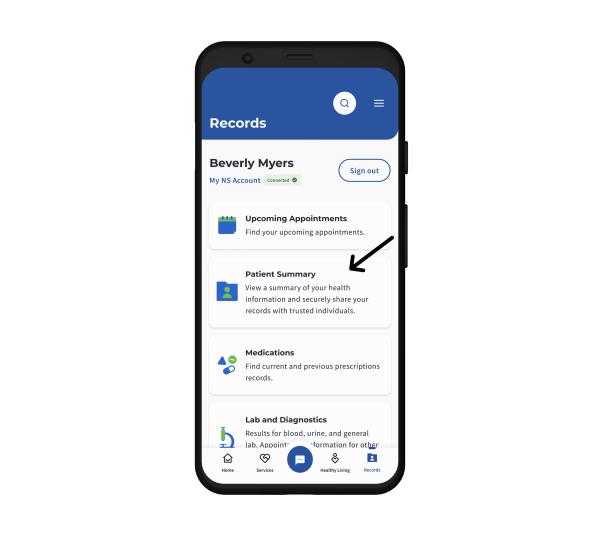
- Click the “View your Patient Summary” tile
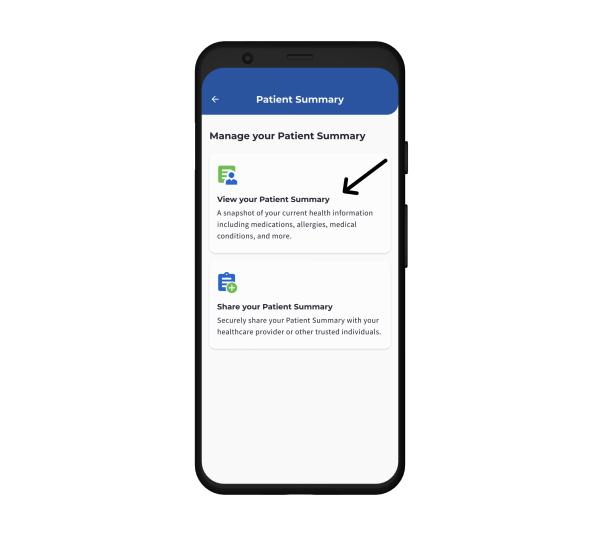
- Navigate through the health information contained in the drop-down menu for each section
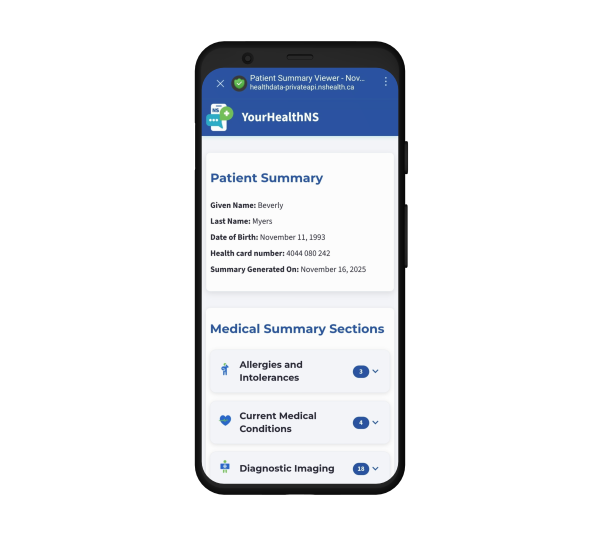
Sharing your Patient Summary
Users can securely share their Patient Summary with a trusted individual, such as a healthcare provider or member of their circle of care, using a secure QR code or link, and creating a unique PIN. Please note that sharing a Patient Summary with any individual, including a healthcare provider, does not guarantee they will view your health information.
When to share your Patient Summary
Share your Patient Summary when you want to give someone you trust access to a synopsis of your current healthcare information. For example:
- You’re receiving medical care from a new or different provider within Nova Scotia and want to provide a whole picture of your current health status
- You’re receiving medical care in another province
- You want to share your health information with a member of your circle of care
Protecting your personal health information
To protect your sensitive information, the link that shares your Patient Summary, QR code and PIN expire after 24 hours. If you wish to stop sharing your information before it expires, you can delete it from your Share list. No patient information is stored on any mobile device.
Important things to keep in mind before sharing your Patient Summary:
- Anyone you share your Patient Summary with will be able to see all personal health information contained in your summary
- Only share your Patient Summary with individuals you trust to keep your personal information safe
- Create a new share each time you wish to give someone access to your Patient Summary
- When sharing your Patient Summary, ensure you share the PIN in a separate message from the link or QR code
- Recipients of your Patient Summary will have five PIN access attempts for a specific link or QR code. If they fail five times, the PIN will automatically be deleted. You will need to create a new Share to give this recipient access to your Patient Summary
- Healthcare professionals may only reshare your information with other healthcare professionals who must follow privacy best practices under the Personal Health Information Act (PHIA)
- Other individuals you may choose to share your Patient Summary with are not bound by privacy laws. It's important to clearly state your expectations about how they use the information in your Patient Summary
- It is recommended that emails containing Patient Summary links, QR codes and/or access PINs are deleted after they are accessed
- If you open a Patient Summary link via web browser, you are advised to close the tab once done viewing the information.
For more information on keeping your personal health information safe as a YourHealthNS user, visit the YourHealthNS Privacy Policy.
How to share your Patient Summary
To share your Patient Summary:
- Log in to the Records section of YourHealthNS and find the “Patient Summary” tile
- Click the “Share your Patient Summary” tile
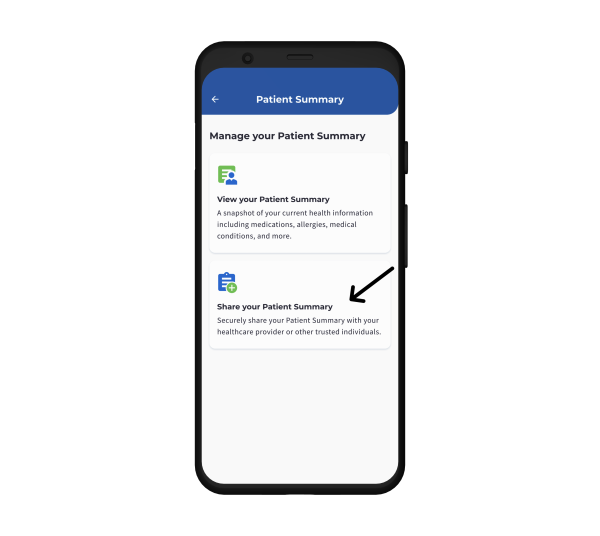
- Carefully read the Patient Summary Privacy Statement and check the box to confirm your acknowledgement, then click “Continue”
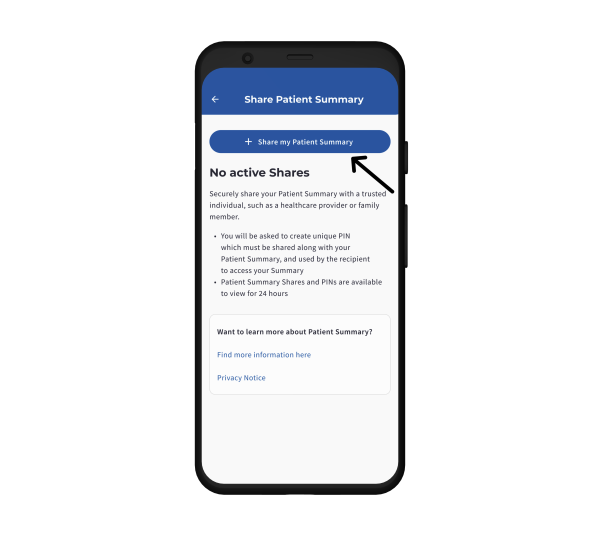
- Click “Share my Patient Summary” at the top of the Share list
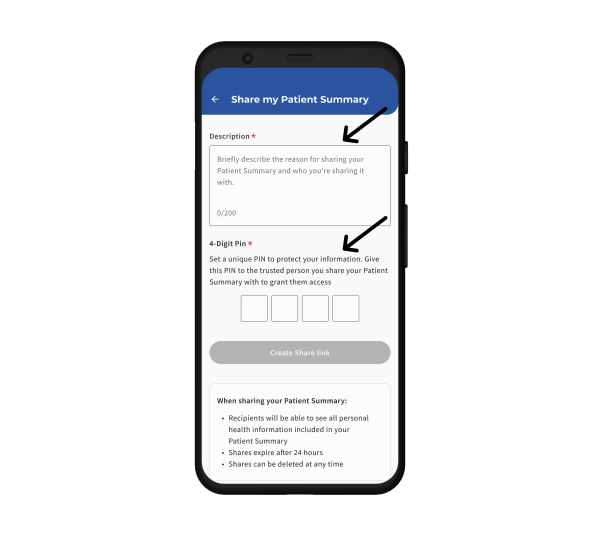
- Give your Patient Summary share a brief description, such as “Antigonish Emergency Department visit – foot pain,” and create a unique PIN for the share. Click “Create Share”
- If you are in the same room as the recipient of your Patient Summary, have them scan the QR code and provide them with the PIN to access. Otherwise, share your Patient Summary by either sending the secure link or QR code to the recipient
- Share the unique PIN with the recipient in a separate message.
If you have questions or concerns about the information in your Patient Summary, you can reach out to YourHealthNS Support. Providers with questions or concerns can also submit requests through YourHealthNS Support.
For technical support or to report an issue with Patient Summary, please contact YourHealthNS Support.
To access your own healthcare records, as well as service information, resources and answers to your health-related questions, download the app or visit YourHealthNS.ca.
For more information on YourHealthNS, including FAQs, visit the YourHealthNS information webpage.